Category: Uncategorized

  • News Roundup: September 7–16, 2026

    A heavier week than the last one. The MikroTik router chain I flagged in the last roundup turned out to be a live zero-day, a popular WordPress events plugin picked up a 9.8 RCE, and Cisco dropped another advisory batch.

    • MikroTik’s “no details yet” RouterOS release from the last roundup turned out to be actively exploited. CERT Polska disclosed the chain, dubbed MikroTrick: CVE-2026-67276 (SSH auth bypass, CVSS 9.2) combined with CVE-2026-86060 (privilege escalation) gives an unauthenticated attacker full admin on any RouterOS device with SSH reachable from the internet. Exploitation reportedly started September 2, a day before the patch shipped, so this was a zero-day in practice. CISA added both CVEs to its KEV catalog on September 10, and Shadowserver counted roughly 122,500 internet-exposed RouterOS SSH endpoints as of September 5. If you haven’t patched to 7.24.2, 7.23.4, or 6.49.21 yet, do that now, then check for a “Flagged” device status and an unexpected user named something like “ops” before assuming you’re clean.
    • The Events Calendar plugin patched two critical code-injection bugs. CVE-2026-78159 (CVSS 9.8) is an unauthenticated code injection from insufficient validation; a second flaw, CVE-2026-78006, is also critical. Both need comments enabled on the plugin to be exploitable. Fixed in 6.17.3.1, but the plugin has over 600,000 active installs and download data suggests roughly half may still be sitting on a vulnerable version.
    • Cisco’s September 16 advisory batch covers hardening releases for BroadWorks CommPilot, Identity Services Engine, Nexus Dashboard, ThousandEyes Virtual Appliance, and a combined release for all three Secure Firewall products (ASA, FMC, and FTD). Worth calling out separately: the same batch includes a Secure Email Gateway hardening release with a SQL injection flaw that Cisco says is already being exploited, which bumps it above the usual “patch when convenient” priority.
    • WordPress 7.1.1 is still on track as a bug-fix-only release for tomorrow, September 17, covering 16 core tickets and 22 Gutenberg pull requests. No security content in this one, but if anything you run leans on responsive styles, the Icon Registration API, or the iframed editor, it’s worth a spin on staging before it lands.
  • XGS-PON vs GPON: What Actually Changed

    XGS-PON vs GPON: What Actually Changed

    If you’ve spent any time around FTTH deployments, you’ve heard both terms thrown around like they’re interchangeable steps on the same ladder. They’re related, but the differences matter for anyone speccing an OLT/ONU deployment or trying to explain to a customer why “fiber” doesn’t mean one fixed speed. Here’s the breakdown, grounded in the actual ITU-T recommendations rather than marketing copy.

    GPON: ITU-T G.984

    GPON (Gigabit-capable Passive Optical Network) is defined by the ITU-T G.984 series, first standardized in 2003. It’s asymmetric:

    • Downstream: 2.488 Gbps
    • Upstream: 1.244 Gbps
    • Wavelengths: 1490 nm downstream, 1310 nm upstream
    • Encapsulation: GEM (GPON Encapsulation Method)
    • Typical split ratio: 1:32, with 1:64 supported in later profiles
    • Reach: up to 20 km. ITU-T defines several optical budget classes (A, B, B+, C, C+), ranging from 5 dB up to 32 dB depending on class; B+ (13–28 dB) is the most commonly deployed

    GPON has been the dominant residential FTTH standard for close to two decades, and it’s still what most ONTs in the field are running.

    XGS-PON: ITU-T G.9807.1

    XGS-PON (10 Gigabit-capable Symmetric PON) is the direct evolution, standardized under ITU-T G.9807.1, approved in 2016. The “S” is the whole point: unlike the earlier asymmetric XG-PON1 (G.987, 10 Gbps down / 2.5 Gbps up), XGS-PON is fully symmetric:

    • Downstream: 10 Gbps
    • Upstream: 10 Gbps
    • Wavelengths: 1577 nm downstream, 1270 nm upstream
    • Encapsulation: XGEM
    • Typical split ratio: 1:64, extending to 1:256 in some deployments
    • Reach: 20 km physical reach in the base standard (up to 60 km logical/differential distance); longer physical reach (up to 40 km) requires the separate G.9807.2 reach-extension recommendation

    The wavelength choices aren’t arbitrary. GPON and XGS-PON were deliberately assigned non-overlapping bands so that both systems can run on the same outside plant simultaneously, using WDM coexistence elements at the OLT and passive filters at the ONU. That’s the mechanism that lets an operator light a GPON and an XGS-PON service off the same PON splitter without touching the fiber plant. G.984.5 defines the enhancement band reservations that make this coexistence possible, and it gets updated as new PON generations are added to the stack.

    Why It’s Not Just “Faster GPON”

    A few things get lost when this is summarized as “XGS-PON is 4x the speed”:

    It’s symmetric, GPON isn’t. GPON’s upstream is barely half its downstream. That’s fine for residential browsing and streaming, but it’s a real constraint for anything upload-heavy — backup traffic, cloud workloads, business customers pushing data outbound. XGS-PON removes that asymmetry entirely.

    FEC is mandatory, not optional. XGS-PON specifies forward error correction as a baseline requirement to hit its higher line rates reliably over the same class of optical budget GPON uses. This is part of why XGS-PON can extend split ratios and reach without a proportional jump in optical launch power.

    It’s designed to coexist, not replace overnight. Because XGS-PON was built to share ODN infrastructure with GPON via WDM, an operator can overbuild an XGS-PON overlay onto existing GPON splitters and migrate subscribers ONT-by-ONT rather than doing a fork-lift upgrade of the outside plant. That’s a meaningfully different migration story than earlier PON generation jumps.

    Practical Takeaways

    • If you’re still running GPON at scale, you don’t need to panic-migrate. It’s a mature, well-understood standard with an enormous installed base of ONT hardware.
    • If you’re planning new builds or serving upload-sensitive customers (small business, anyone doing real cloud backup), XGS-PON is the sane default now — the ONU cost premium has come down enough that it’s not the barrier it was five years ago.
    • Coexistence means the two aren’t mutually exclusive on the same PON. You can run both off one OLT chassis with the right optics and splitter plant, which is usually how operators actually do the transition.

    The short version: GPON and XGS-PON aren’t “old” and “new” versions of the same thing so much as they’re two standards deliberately engineered to run side by side on the same glass, with XGS-PON picking up the symmetric bandwidth and split-ratio headroom that GPON’s asymmetric design never had room for.

  • Cron Job for Let’s Encrypt nginx standalone renew Ubuntu

    I run nginx as a reverse proxy for sites that use SSL. Normally I’m doing something a bit strange so it doesn’t quite work having certbot manage my configs. This will renew ssl certs at 3am each morning if needed.

    0  3    * * 1   root    /usr/bin/certbot --standalone renew --pre-hook "systemctl stop nginx" --post-hook "systemctl start nginx" > /dev/null 2>&1
  • Getting GeoJson Multipolygon for political units

    Editor’s note (2026): The polygons.openstreetmap.fr tool referenced below has a long history of intermittent outages — if it’s down when you need it, Nominatim’s own export/lookup or the Overpass API are good fallbacks for pulling relation geometry.

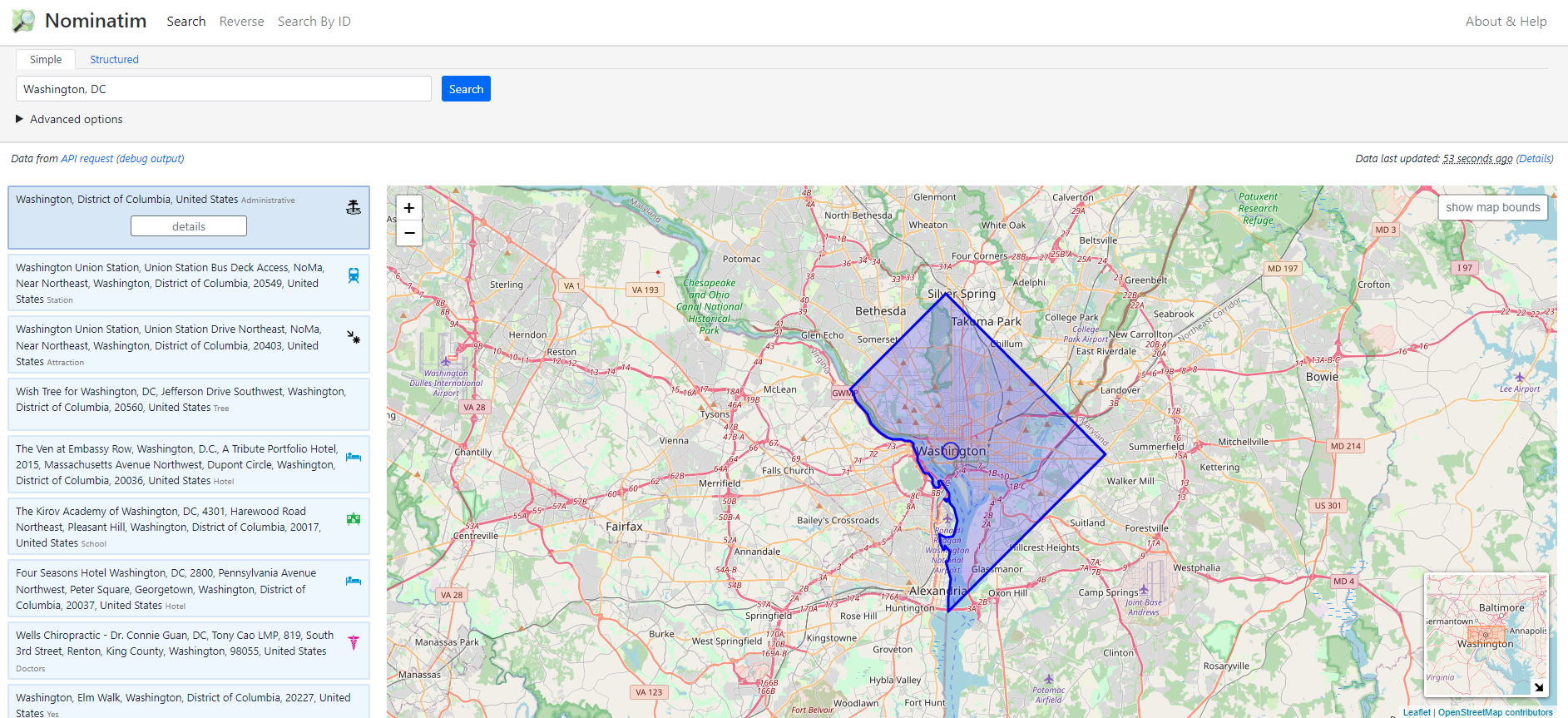
    Visit: https://nominatim.openstreetmap.org/ui/ and search for the location.

    Enter in the Location on the search bar

    Select the Details Button on the left for the entity you are interested in.

    Look for the value for the OSM relation id. In this case it is: 5396194.

    Visit the following URL: http://polygons.openstreetmap.fr/index.py and enter in the OSM relation id from above. You can use on eof the original geometries selected or generate a simplified version by setting the value of X to 0 and submitting. Then click on the geoJSON link.

    The geoJSON can then be imported into your database of choice such as:

    INSERT INTO table set gis = ST_GEOMFROMGEOJSON('{"type":"MultiPolygon","coordinates":[[[[-77.13,38.93],[-77.04,39.01],[-76.91,38.91],[-76.9,38.88],[-76.93,38.87],[-77.03,38.78],[-77.05,38.78],[-77.06,38.83],[-77.05,38.86],[-77.13,38.93]]]]}');
  • ext4 partition resize

    Editor’s note (2026): the original version of this post used `xfs_growfs`, which is for XFS filesystems, not ext4 — mismatched with the title. Corrected below: `resize2fs` is the ext4 equivalent.

    Never fails, I have to look it up every time. The sort though blogs, posts and generally bad information.

    For ext4:

    lvextend -l +100%FREE /dev/vg/lv_root
    resize2fs /dev/vg/lv_root
    

    For XFS, the equivalent is:

    lvextend -l +100%FREE /dev/vg/lv_root
    xfs_growfs /mount/point
    
  • SQL: Greatest N per Group

    I run into this quite a bit. You have an auto incrementing row where you are interested in the last (most recent) entry made for a group of records.

    SELECT a.*
    FROM YourTable a
    LEFT OUTER JOIN YourTable b
        ON a.id = b.id AND a.rev < b.rev
    WHERE b.id IS NULL;